Skin Tone Hex Code: Mastering Perfect Match Colors
In the digital world, colors play a significant role in graphic design, web development, and data visualization. However, representing these colors digitally can be challenging. This is where hex color codes come into play, providing a universal language for colors across various platforms. But what about skin tones? Have you ever wondered how to find or create hex codes for skin tones?
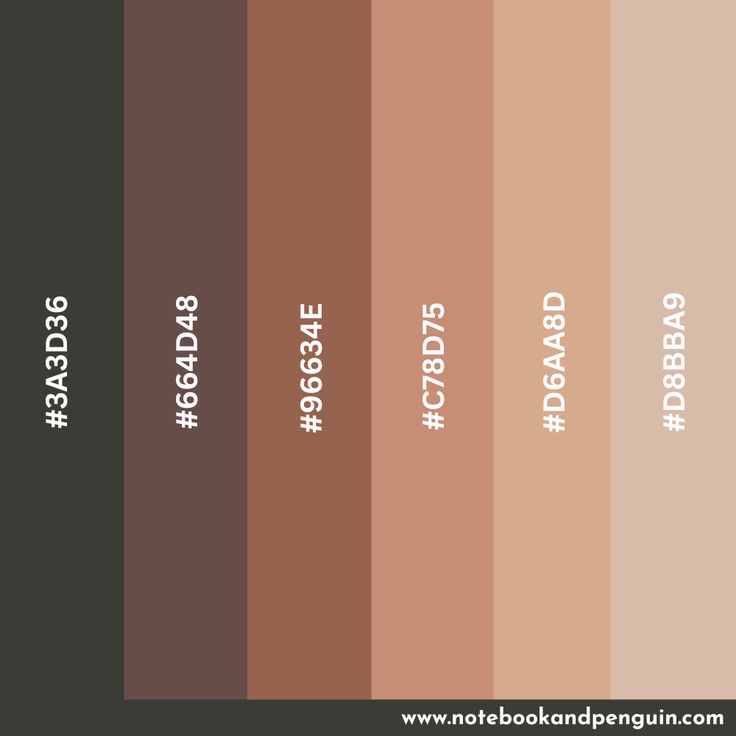
Skin tone hex codes are essential for creating inclusive designs, ensuring that everyone can resonate with the visual elements in your projects. With the increasing emphasis on diversity and representation, it's crucial to understand how to work with these codes. So, let's dive into the world of skin tone hex codes, exploring how to find, create, and use them effectively.
Understanding Skin Tone Ranges
Before we delve into hex codes, it's essential to understand the range of human skin tones. The Fitzpatrick scale, a widely accepted classification, divides skin types into six categories based on how they respond to UV light: Type I (pale white) to Type VI (deeply pigmented dark brown). These categories provide a starting point for creating skin tone hex codes.


The colors of these skin tones span a broad spectrum, from light pinkish shades to deep, dark browns. This variation makes it crucial to have an extensive range of hex codes to accurately represent diverse skin tones.
Popular Skin Tone Hex Code Ranges
Several pre-established skin tone hex code ranges exist to help you find the perfect shade. Two popular examples are the "Skin Tones 20" by Germán Bertolone and the "Ighoaram #SkinTone" palette. Both these ranges provide a diverse selection of hex codes, covering a wide array of skin tones.


For instance, Bertolone's skin tones range from #F4CFCF (Pale) to #4D260D (Very dark), with each shade incrementally darker than the last. Ighoaram's palette, on the other hand, offers a wider range, from #FFC125 (Light/Nude) to #321400 (Very dark/Dark Chocolate). These ranges ensure you can find the perfect hex code for any skin tone.
Creating Custom Skin Tone Hex Codes
While existing ranges provide a excellent starting point, you might need to create custom skin tone hex codes for specific projects. Creating these codes involves understanding the RGB (Red, Green, Blue) model, which is the foundation of digital color representation.
To create a custom skin tone hex code:


- Start with the base RGB values of a skin tone. For example, light skin tones tend to have higher RGB values (closer to 255), while dark skin tones have lower values (closer to 0).
- Adjust the RGB values to match your desired skin tone. For instance, to make a skin tone lighter or darker, change the values in small increments. Incremental changes ensure the color remains within the natural range of human skin tones.
- Convert the RGB values to a hex code using an online RGB to hex color converter. This tool will provide you with the corresponding hex code.
Remember, creating custom skin tone hex codes requires experimentation and patience. It's best to take small steps in adjusting RGB values to avoid creating unnatural skin tones.
Using Skin Tone Hex Codes in Your Projects
Once you've identified or created the perfect skin tone hex code, it's time to incorporate it into your projects. This could be in graphic design, web development, data visualization, or even in game development.
In web development, you can use skin tone hex codes in CSS to style HTML elements. For instance, to change the background color of a div element to a specific skin tone:



<style>
  .skin-tone {
    background-color: #YourHexCode;
  }
</style>
<div class="skin-tone"></div>
Ensuring Accessibility
When using skin tone hex codes, it's crucial to consider accessibility. Not all users may perceive colors in the same way due to color blindness, poor vision, or other factors. To ensure your designs are accessible:
- Use color contrast checkers to ensure there's enough contrast between skin tone colors and their surroundings, making them easily distinguishable by everyone.
- Provide alternative methods of communication, such as text descriptions, to supplement visual information.
- Follow Web Content Accessibility Guidelines (WCAG) to create content that's accessible to everyone.
By following these guidelines, you'll ensure that your designs are inclusive and accessible to all users, regardless of their visual abilities.
In the steadily evolving landscape of digital design, understanding and efficiently utilizing skin tone hex codes are not just beneficial but necessary. By embracing the diversity of human skin tones in your projects, you foster inclusivity and create truly representative digital spaces. So, go ahead, explore the rich spectrum of skin tone hex codes, and let your designs reflect the amazing variety of the human race.
Related Articles
Perfect Match: Find Your Olive Skin Tone Hex Code
When you're working with colors in graphic design or web development, you often encounter hex codes. These are six-digit numbers preceded by a hash (#) that...
Skin Tone Colors & Hex Codes: Perfect Match Every Time
In the realm of graphic design and web development, colors are the lifeblood of visual communication. One of the most fundamental aspects of assigning color to...

Mastering Hair Dyes: The Ultimate Guide for Perfect Brow Color Code Match
Ever found yourself struggling to match the perfect brow shade with your skin tone? You're not alone. With a wide array of brow colors lining the shelves, it...

Caucasian Skin Tone Hex Codes: Perfect Match Every Time
The term "Caucasian skin tone hex" often leaves people curious about its meaning and relevance in today's digitally interconnected world. It's not just a...

RGB Code for Copper: Perfect Matching Colors
The RGB (Red, Green, Blue) color code provides a precise way to replicate almost any color on electronic displays. When we talk about the RGB code for copper...
Skin Tone Hex Colors
In the digital landscape, color plays a pivotal role in communicating concepts and ideas. One aspect where color is crucial, yet often overlooked, is SKIN TONE...