Skin Color Hex Codes: Find Your Perfect Shade
Diving into the realm of digital design, understanding and utilizing skin color hex codes is an essential skill for any graphic designer or web developer. These six-digit codes, prefixed with a hash symbol (#), define shades and tints of colors, providing consistency and precision in both print and digital mediums. But what exactly are they and how do they work?
At their core, hex color codes are based on the RGB (Red, Green, Blue) color model. Each pair of characters in the six-digit code represents the intensity of each color's component, ranging from 00 to FF (decimal equivalents 0 to 255), resulting in 16,777,216 possible colors.
Understanding Hex Color Codes
The first two digits of a hex code determine the red intensity, the next two the green, and the last two the blue. By changing these values, designers can create a wide spectrum of colors.


For instance, consider the hex code #FFFFFF. In this case, all three color components are at maximum intensity (FF), resulting in the color white. Similarly, #000000 is the opposite, producing the color black with all components at minimum intensity (00).
Hex Codes for Common Skin Tones
In the context of color representation, it's crucial to understand that different cultures and individuals have unique skin tones. There's a spectrum of shades, each with its own hex code.


For example, a light skin tone might be represented by #F5DEB3, while medium skin tones can vary between #C7BEB8 and #8F6123. Darker shades might be close to #49291A. These are just approximations, as skin tones vary widely and subtly.
The Importance of Accessibility in Skin Tone Representation
When using skin tone colors in design, accessibility is a crucial factor. It's vital to choose colors that can be discerned appropriately by people with visual impairments or color blindness.
Tools like color contrast checkers can help ensure that text colors provide sufficient contrast against their background, aiding in the accessibility of your designs. This is particularly important in webpage design, where easily readable text is crucial for user experience.


Using Hex Color Codes in CSS
Hex color codes are universally supported in CSS (Cascading Style Sheets), making them convenient for web developers to use. They can be used to specify colors for text, backgrounds, and other elements on a webpage.
For instance, to change the background color of a webpage to a specific skin tone, you might use the following CSS code:
background-color |
#8F6123; |
Hex Color Codes in Design Software
In graphic design software like Adobe Photoshop or Illustrator, hex color codes can be inputted manually or obtained by using the color picker tool. This tool provides the current color's hex code, making it easy to copy and paste.


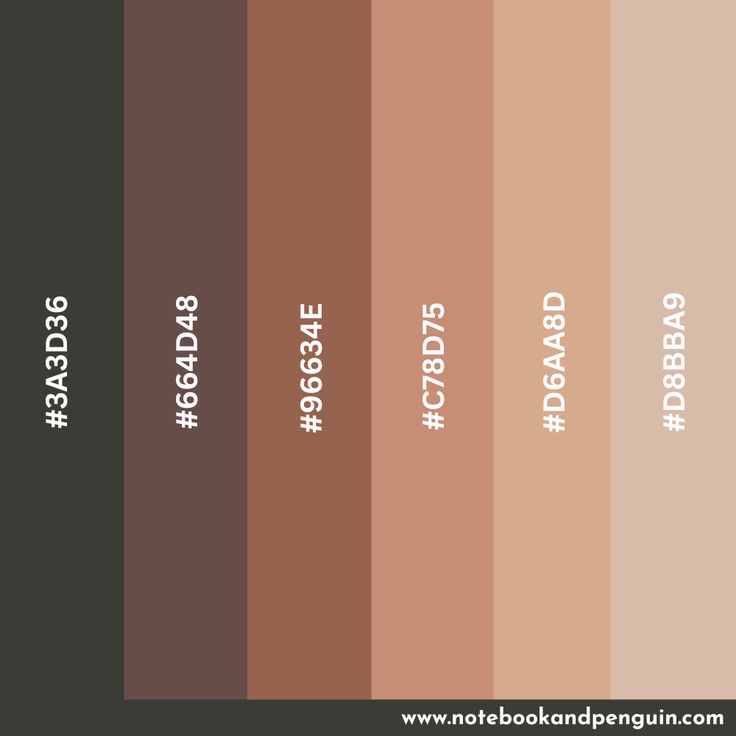

Additionally, many design software tools provide color wheels, swatches, or preset palettes to assist in quick color selection.
Hex color codes inereurabilities and limitations
While hex color codes offer a vast range of colors, they aren't without their limitations. The viewing of colors can differ significantly across devices due to variations in screen calibration and display technology.
Moreover, the RGB color model doesn't accurately represent all colors in nature. The CMYK (Cyan, Magenta, Yellow, Black) color model, used primarily in printing, can produce a broader range of colors but is not web-compatible as it doesn't use hex codes.
In conclusion, understanding and effectively using skin color hex codes is fundamental for designers and developers to create inclusive, accessible, and visually appealing designs. Whether you're designing a webpage, a logo, or a print brochure, hex codes are indeed the language of color, deserving every designer's mastery.
Related Articles

Metallic Color Codes: Find Your Perfect Shade
The metallic color code, often abbreviated as Munsell Value, is a scale used to quantify the lightness (or darkness) of a color, regardless of its hue or...

Unveiling the Perfect Ginger Hair Color Code: Find Your Shade
Daring to be different, ginger hair color is a bold and vibrant trend that's capturing attention in the world of fashion and beauty. Usually represented by the...

Seafoam Blue Color HEX Code: Find Your Perfect Shade
In the world of automotive finishes, the term "seafoam blue color number" often surfaces in discussions among car enthusiasts, restorers, and history buffs...

Dusty Rose Color Code: Find Your Perfect Shade
The term "dusty rose" has gained significant traction in the world of color trends, becoming a favored hue across various industries and spheres of life. But...

# Rust Red Hex Code: Find Your Perfect Shade
The rust red hex code, #8B4513, is a captivating shade that adds a touch of warmth and vintage charm to any digital design or interface. In the vast landscape...

Perfect Cream Color Codes for Your Palette
Delving into the world of color, specifically cream, often necessitates referencing cream color codes to achieve accurate hues in design and production. This...