Skin Color Hex Code Chart for Easy Web Design
Have you ever wondered how computers understand and represent colors? It might surprise you, but they don't see colors the same way humans do. Instead, they use a system called hexadecimal color codes to represent a wide range of colors. One of the most common color representation systems, the hex color code, allows you to define colors precisely, ensuring consistency across different digital platforms.
At its core, a hex color code is a six-digit number preceded by a pound sign (#). Each pair of digits represents 256 shades of red, green, or blue (RGB). By combining different RGB values, you can create a vast array of colors. But what are the basics you need to know about skin color hex codes, and how can you find or create them?
The Role of Skin Tones in Hex Color Codes
Skin tones are an essential aspect of web design, photography, and digital art. They enable us to create realistic human figures, convey emotions, and develop inclusive designs. Hex color codes play a crucial role in defining and representing these diverse skin tones.


Many designers use references like the Fitzpatrick scale or the CIELAB color space to categorize and represent skin tones. However, representing skin tones in hex codes involves understanding the baseline values for red, green, and blue that correspond to these skin tone scales.
Understanding RGB Values for Skin Tones
RGB values range from 0 to 255, with 0 representing the lowest intensity and 255 the highest. To create realistic skin tones, you typically start with the following RGB values as a baseline:


- Light skin: Around 250 red, 230 green, and 210 blue
- Medium skin: Around 225 red, 180 green, and 145 blue
- Dark skin: Around 160 red, 80 green, and 40 blue
Of course, these are just starting points. To create a wide range of skin tones, you'll need to adjust these values.
Converting RGB to Hex Color Codes
Now that you understand the RGB values for skin tones, let's convert them into hex color codes. Each RGB value is converted to a two-digit hexadecimal number. Here's how you do it:


| RGB Value | Hexadecimal Value |
|---|---|
| 255 | FF |
| 225 | E1 |
| 160 | 9C |
| 80 | 50 |
| 40 | 28 |
So, for instance, a medium skin tone with RGB values of 225, 180, and 145 would convert to the hex color code #E1B491.
Using Skin Color Hex Codes in Practice
Once you have your skin color hex code, you can start using it in your projects. Here's how to do it in a few popular design tools:


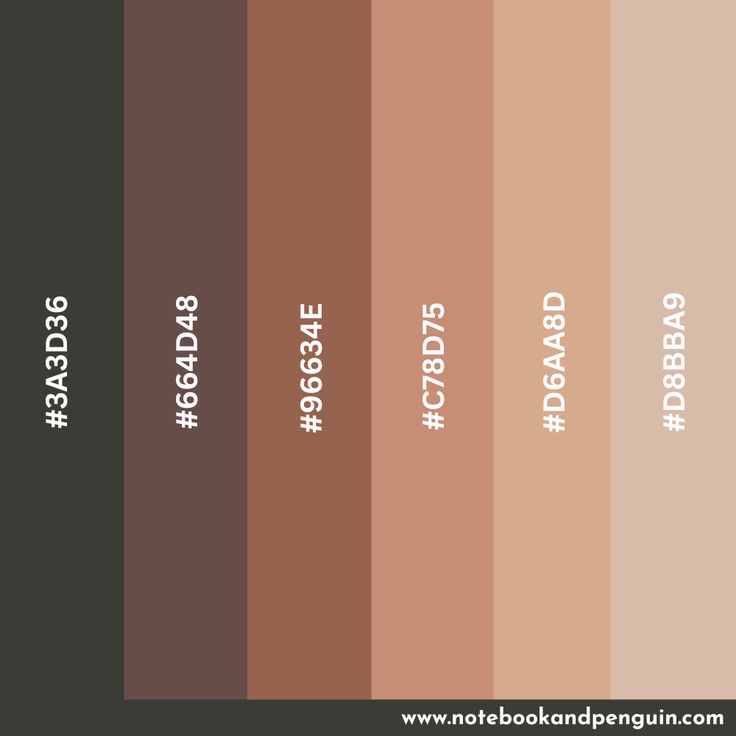


Inserting Skin Color Hex Codes in CSS
To use a skin color hex code in CSS, simply add it as a value for the color property. For example:
background-color: #E1B491;
This would apply the medium skin tone color to a background.
Entering Skin Color Hex Codes in Hex Color Pickers
Many design tools have built-in hex color pickers. To use your skin color hex code, simply enter it in the provided field, and the tool will display the corresponding color. For instance, in Adobe Photoshop:
- Select the color picker tool (or press 'I')
- Click on "Custom" in the Color Picker dialog
- Enter your hex color code (e.g., #E1B491)
- Click "OK" to apply the color
Whether you're a web designer, a digital artist, or a photographer, understanding and using skin color hex codes can significantly enhance your work. It allows you to create more realistic, inclusive, and professional digital projects.
So, go ahead and experiment with different skin tones in your next project. You might be surprised at the depth and nuance you can achieve with just a simple six-digit hex code. Happy creating!
Related Articles

Salmon Hex Code: Color Guide & Uses in Design
Discovering the perfect shade for your web design can be a daunting task, especially when you're aiming for a specific color like salmon. Enter the world of...

Color Code for Cream: Perfect Shades for Every Design
The rich, velvety hue of cream has been a beloved addition to color palettes for centuries, yet determining its precise color code can often be quite the...

"Bronze Hex Color Code: #CD7F32 in Design"
The captivating bronze hex color, denoted as #CD7F32, reigns as a timeless favorite in the realm of interior design and decor, admired for its intriguing blend...

Dark Red Hex Code #FF0000: Shade Chart & Color Palettes
The enigmatic term 'dark red hex code' often perplexes both amateur and seasoned web designers, yet it is a fundamental aspect of color management in digital...

Pear to Color: Easy Color-Matching Chart
The enchanting dance of color and nature unfurls prefactly in the humble pear. This unassuming fruit, often overshadowed by its more vibrant cousins, harbors a...

Wood Color Code Chart: Guide and Cheat Sheet
In the vast array of colors that adorn our world, wood color codes play an essential role. These aren't just mere designations; they're the keys that unlock a...