Salary Scale Template Excel
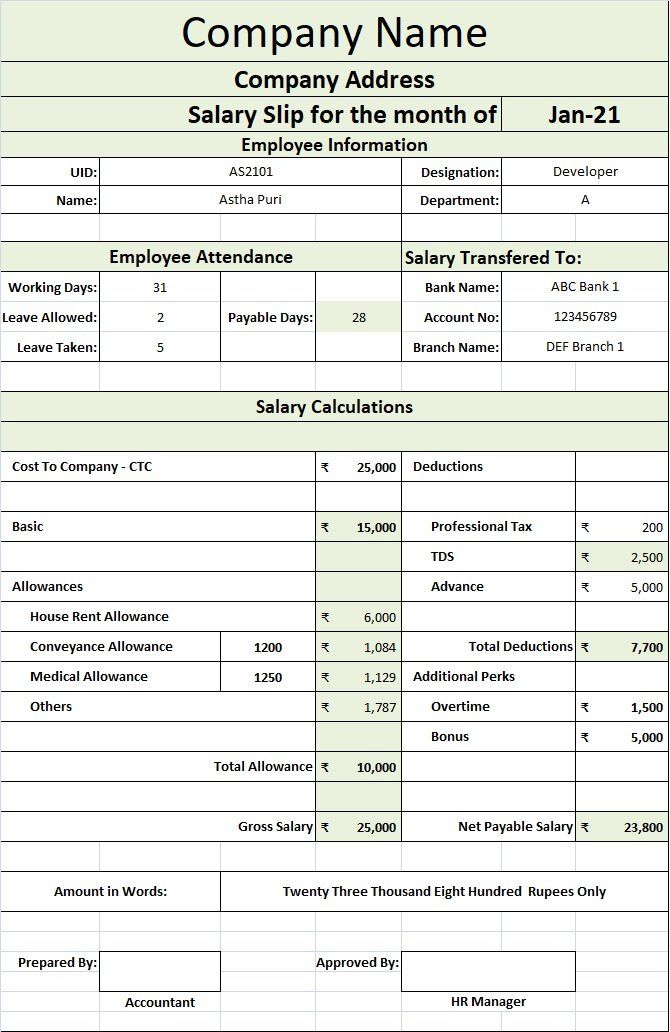
A comprehensive salary scale template in Excel is an essential tool for businesses to maintain consistency and fairness in employee compensation. It helps HR professionals and management teams track and manage employee salaries, ensuring they align with job roles, responsibilities, and market standards.
Effective salary scale management in Excel offers numerous benefits, including improved transparency, enhanced budgeting, and simplified performance evaluation. This article explores the intricacies of creating and using a salary scale template in Excel, providing a thorough guide to optimize your compensation strategy.
Setting Up Your Salary Scale Template
Before delving into the details, it's crucial to understand the key components of a salary scale template in Excel. These include job titles/roles, salary grades, minimum and maximum salaries, and increment rates. With these elements in place, you can create an organized and practical tool for salary administration.


To accommodate your business's unique needs, consider customizing your template to include additional factors such as employee experience, educational qualifications, and skills. This helps ensure your compensation strategy is tailored to your organization's culture and values.
Defining Job Titles and Roles
Clearly defining job titles and roles in your salary scale template aids in understanding the level of complexity and responsibility associated with each position. Use a hierarchical structure to group similar jobs and denote their respective importance and seniority.


When creating your job title list, ensure it's comprehensive yet manageable. Overly detailed job categories can lead to confusion and make it challenging to compare salaries across different departments. Conversely, too few categories may result in inadequate differentiation between roles.
Implementing Salary Grades
Salary grades simplify the process of setting and communicating salaries within your organization. They represent ranges within which employees at specific levels are paid. By assigning salary grades to job titles, you establish a logical and consistent structure for compensation.
To determine salary grades, consider factors like market rates, industry standards, and your organization's compensation philosophy. You can use external resources like salary surveys and job boards to benchmark your grades against industry competitors. Regularly review and adjust your salary grades to reflect changes in the market and internal equity.


Managing Salary Ranges and Increment Rates
Defining minimum and maximum salaries for each grade ensures consistency and fairness in employee compensation. The range provides a structure for evaluating new hires, current employees' salaries, and merit increases. It also helps regulate salary growth within each grade.
incremental rates are vital for determining periodic salary increases for employees within a grade. By setting consistent increment rates, you ensure a measured and predictable approach to salary growth. This helps employees plan their financial futures and promotes transparency and fairness in the compensation process.
Setting Minimum Salaries
Minimum salaries represent the lowest compensation for employees within a specific grade. They should be set based on market data, industry standards, and your organization's compensation philosophy. Consider the skills, qualifications, and experience required for each role when determining minimum salaries.


Setting minimum salaries too high may lead to underpayment for new hires and even experienced employees. Conversely, setting them too low may result in inconsistent compensation practices and difficulty attracting and retaining talent. Carefully analyze market data and consult with HR and finance professionals to establish appropriate minimum salaries.
Setting Maximum Salaries
Maximum salaries represent the highest compensation for employees within a grade. They provide a ceiling for salary growth within each grade and help prevent overpayment for employees. By setting maximum salaries, you ensure that compensation remains proportional to an employee's contribution and avoided over-reliance on tenure for determining salary increases.
Similar to minimum salaries, maximum salaries should be based on market data, industry standards, and your organization's compensation philosophy. Regularly review and adjust maximum salaries to maintain consistency with market trends and internal equity. Additionally, consider the potential for exceptional performance or unique skills to warrant exceptions to the maximum salary.
Calculating Increment Rates
Increment rates, typically expressed as a percentage, determine the percentage increase in an employee's salary after a specified period. By setting consistent increment rates, you establish a predictable and fair process for salary growth. This promotes transparency, communicates clear expectations, and enables employees to plan their financial futures.
To calculate increment rates, consider your organization's compensation philosophy, market trends, and financial resources. Common increment rates range from 2-5%, but it ultimately depends on your business's capacity to invest in employee compensation. Regularly review and adjust increment rates to maintain consistency with market trends and internal equity.
Beyond Excel: Integrating Your Salary Scale Template with Other HR Tools
While Excel offers a powerful platform for creating and managing salary scales, integrating your template with other HR tools can enhance its value and efficiency. For instance, connecting your salary scale template with your HR information system (HRIS) or performance management software can streamline compensation administration and evaluation processes.
By integrating your salary scale template with other HR tools, you can automate data entry and updates, reduce manual errors, and improve the accuracy of your compensation data. This allows you to focus on strategic compensation planning and employee development rather than time-consuming administrative tasks.
Connecting Your Salary Scale Template with HRIS
Integrating your salary scale template with your HRIS enables centralized management of employee data, including salaries, benefits, and performance metrics. This improves data accuracy, simplifies compensation administration, and facilitates data-driven decision-making. Some key benefits of connecting your salary scale template with HRIS include:
- Automatic updates of employee compensation data
- Simplified merit increase, bonus, and stock awards calculations
- Easier tracking of employee tenure, promotions, and position changes
- Better visibility into overall compensation expenditure and budgeting
Leveraging Performance Management Software
Integrating your salary scale template with performance management software helps align employee compensation with performance. By connecting these tools, you can automatically adjust salaries based on an employee's performance ratings and align compensation with your organization's goals.
Some key benefits of leveraging performance management software alongside your salary scale template include:
- Objective-driven compensation increases
- Simplified merit increase and bonus allocation processes
- Better visibility into employee performance and potential
- Enhanced compensation transparency and fairness
In a thriving, competitive business environment, a well-crafted and effectively managed salary scale template in Excel is an invaluable tool for attracting, retaining, and motivating top talent. By following this comprehensive guide, you'll create an organized, sophisticated, and adaptable foundation for managing employee compensation. Regularly review and update your salary scale template to ensure it remains relevant, competitive, and compliant with internal and external best practices. Embracing an active and data-driven approach to compensation management will pay dividends in employee engagement, productivity, and organizational success.
Related Articles

Gantt Chart Template for Excel: Free Download
A Gantt chart is an essential tool for project managers, helping them visualize and plan project schedules in an efficient manner. Excel, being a versatile...

Organize Your Books: Free Publishing Tracker Excel Template
Staying organized and tracking your publications is crucial for content creators, authors, and businesses. One of the most efficient ways to do this is by...

Due Diligence Report Excel Template: Format Guide
The meticulous task of conducting due diligence often involves the careful analysis of vast amounts of data. When presenting this information in a clear and...

Order Form Generator 2022: Free Excel Template Download
Discovering the advantages of automating purchase orders? Excel's XLS format might just be the bridge you're looking for. Understanding how to create and...

Strength & Conditioning Excel Template Free Download
Are you a fitness enthusiast looking to enhance your training programs? Or perhaps a strength and conditioning coach aiming to streamline your athlete's...

Commission Pay Excel Template
Streamlining your commission-based business or sales operations demands precise tracking and calculation of earnings and payouts. An Excel template tailored...