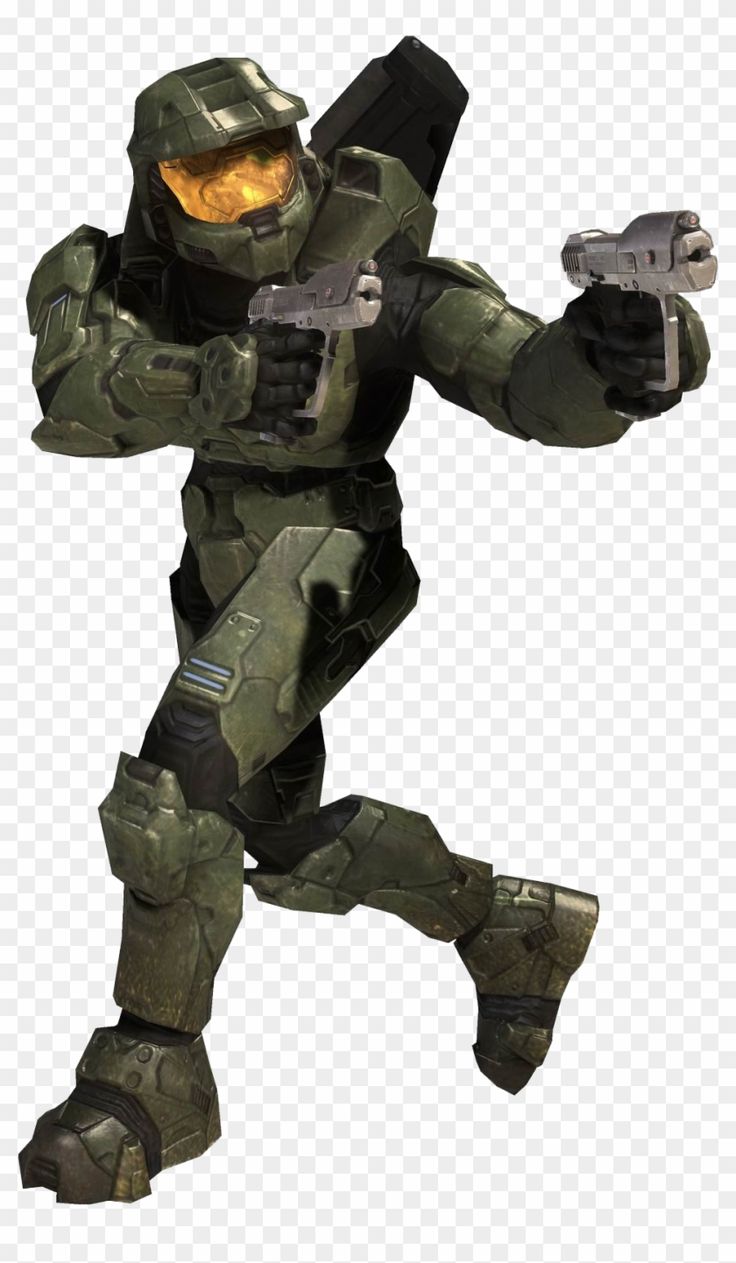
Halo 2 Master Chief PNG: High-Quality Images for Gamer Heads
For gaming enthusiasts, the name Halo and Master Chief is almost synonymous with console gaming evolution. If you're looking for high-resolution Master Chief PNGs from Halo 2, you've come to the right place. Let's delve into the world of Halo graphics and explore how you can obtain Master Chief PNGs from Halo 2.
Halo 2, released in 2004, was a groundbreaking game that pushed the Xbox's capabilities. Its iconic characters, environmental design, and animation have left a lasting impact on the gaming community. Master Chief, the series' protagonist, is one of the most recognizable characters in gaming history. Let's discover how you can find and use Master Chief PNGs from Halo 2.
Understanding PNG Format
Before we dive into finding Master Chief PNGs, let's quickly understand the PNG format. PNG stands for Portable Network Graphics. It's a bitmap image format that uses lossless data compression. PNG is ideal for graphics that require transparency, like logos, and is widely used in web design and graphic software.


Master Chief PNGs from Halo 2 can be used in various projects, from graphic design to website development. They can be resized, recolored, and styling modified without losing quality, making them highly versatile.
Finding Master Chief PNGs from Halo 2
There are several ways to find Master Chief PNGs from Halo 2. Here are a few methods:


- Fan-created Content: Many Halo fans have created and shared Master Chief PNGs. Websites like DeviantArt, Pinterest, and Reddit have communities dedicated to Halo, where you can find user-generated content.
- Halo Asset Websites: Several websites specialize in providing assets from Halo games. These include models, textures, and images. Websites like Halo.es and Halo Archive may have Master Chief PNGs from Halo 2.
- Halo Modding Communities: Halo modding communities often create and share tools that can extract assets from the game. These communities have forums and Discord servers where you can find and request Master Chief PNGs.
Extracting Master Chief PNGs from Halo 2
If you're unable to find Master Chief PNGs online, you can extract them from the game files. This process involves using game modding tools and can be complex. Here's a simplified step-by-step guide:
- Backup your Halo 2 game files. Extraction tools can modify game files, so it's essential to have a backup.
- Use a tool like Halo Mod Kit or Blam! to extract the necessary files. These tools can extract textures, models, and other assets from the game.
- Convert the extracted files to PNG format using image editing software like Photoshop or GIMP. Some extraction tools may convert the files automatically.
Using Master Chief PNGs in Your Projects
Once you have your Master Chief PNGs, you can use them in various projects. Here are a few ideas:
- Graphic Design: Use the PNGs in your graphic design projects. They can be incorporated into fan art, logos, or other graphic designs.
- Web Design: Master Chief PNGs can be used in web design projects. They can add a touch of nostalgia to your website or be used as part of a Halo-themed website.
- Game Development: If you're developing a game, you can use the PNGs as sprites or other graphical elements. They can also be used as reference materials for 3D modeling.
Master Chief PNGs from Halo 2 can be a great addition to your graphic design library. Whether you're using them in a personal project or a professional one, these PNGs can bring a touch of the Halo universe to your work. Happy designing!




Related Articles
Halo 2 Master Chief PNG: Iconic Spartan in High-Resolution
The iconic Halo 2 Master Chief image is deeply ingrained in the gaming landscape, serving as a symbol of power and resistance. This high-quality PNG image...
Master Chief PNG: Halo's Icon in High-Res Transparent Images
Looking for the iconic Halo Master Chief's PNG image for your gaming project or artwork? You've come to the right place. Halo's Master Chief Petty Officer...

Halo Sword PNG: High-Quality Weapon Images for Gaming & Editing
The Halo series, developed by Bungie and 343 Industries, is renowned for its intricate lore and iconic gaming elements, with the Energy Sword being one of its...
Halo Game PNG: Master Chief's Iconic Art in High-Quality
The Halo game franchise has left an indelible mark on the gaming world, and its iconic imagery extends to the PNG format, used widely for graphics and...

Halo Arbiter PNG: Download High-Quality Transparent Images
The Halo series, a globally recognized first-person shooter, is renowned for its iconic characters, intricate gameplay, and visually stunning environments. One...

Master Chief: The Ultimate Gamer
The gaming world was buzzing with a unique blend of amusement and disbelief when a iconic character, Master Chief from the Halo franchise, was depicted...